How Labs Conducts Keyboard Testing
In this article we explore the keyboard tests and methodology that we use for the product review articles on this website and also for LTT and SC projects.
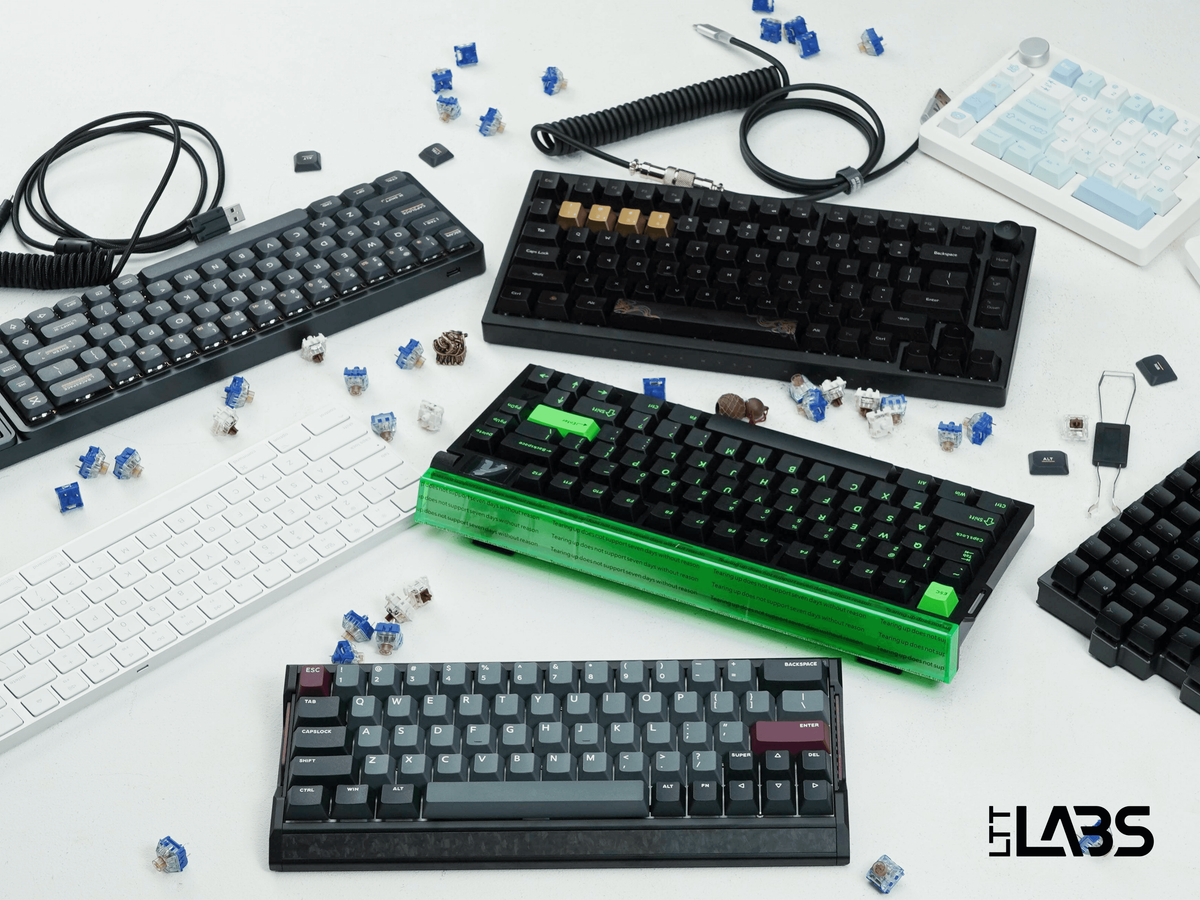
Keyboards can be one of the most personal pieces of tech we use every day. For some, they’re creative tools for writing essays or code; for others, they’re precision instruments for competitive gaming. Whether you’re slamming out a novel or bunny-hopping through Counter-Strike, this all relies on the core functionality of the keyboard to quickly and accurately execute your commands.
That’s where Labs comes in. We strive to go beyond “it feels good” by using specialized equipment to measure latency, force travel, and the auditory experience in ways that are consistent and repeatable. However, typing is still personal, and no chart can tell you if you will enjoy the sound of a spacebar thock when typing. So by pairing hard data with real impressions, we aim to give you the clearest sense of what to expect from a given keyboard.
Tests We Conduct
Before we measure anything, each keyboard goes through a short preparation ritual.
- Update to the latest firmware.
- Set debounce time to the lowest setting.
- Set polling rate to the highest setting.
Additionally, some tester discretion is applied and documented if other settings could affect performance. This ensures every keyboard is tested under its best conditions and results are as comparable as possible. From there, we run a series of tests that cover latency, actuation, polling behavior, rollover, and sound.
Latency Testing
Latency is one of the most important numbers for anyone who cares about responsive input. To measure it, we use a custom setup that combines a Beagle USB 480 analyzer with a solenoid driven by the Elegoo Uno R3 (a microcontroller compatible with Arduino software).
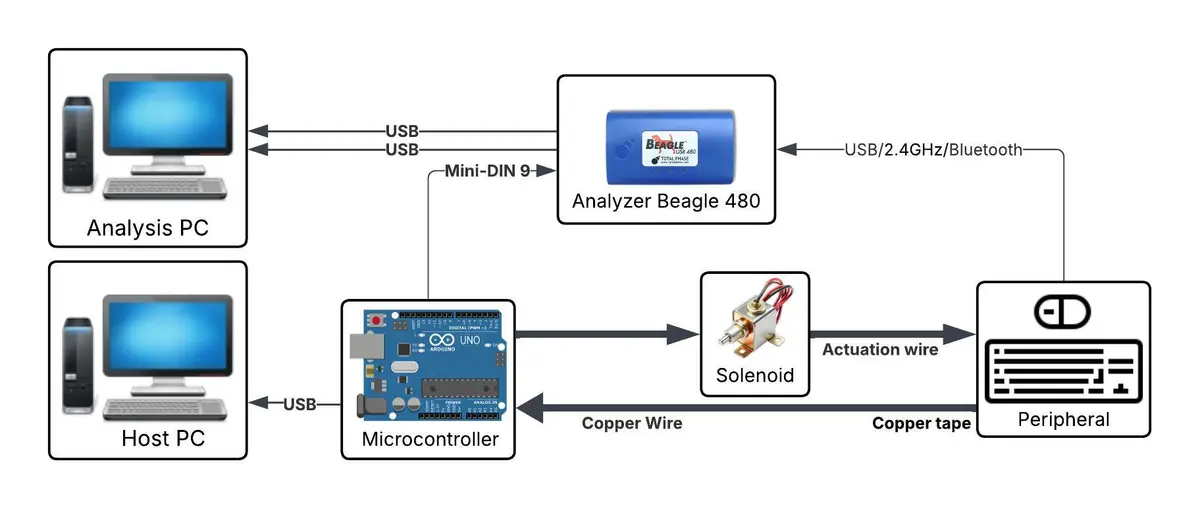
The process is as below:
- We use Total Phase’s Data Center Software with the Beagle USB 480 analyzer to identify the exact USB packet that corresponds to a key press.
- The solenoid acts as a mechanical finger, pressing a key with consistent force and timing.
- A strip of copper tape applied to the key and wired to the microcontroller detects the exact moment the solenoid makes contact, giving us a precise physical reference point.
- The latency is calculated by comparing the timestamps of the physical contact and the USB packet transmission
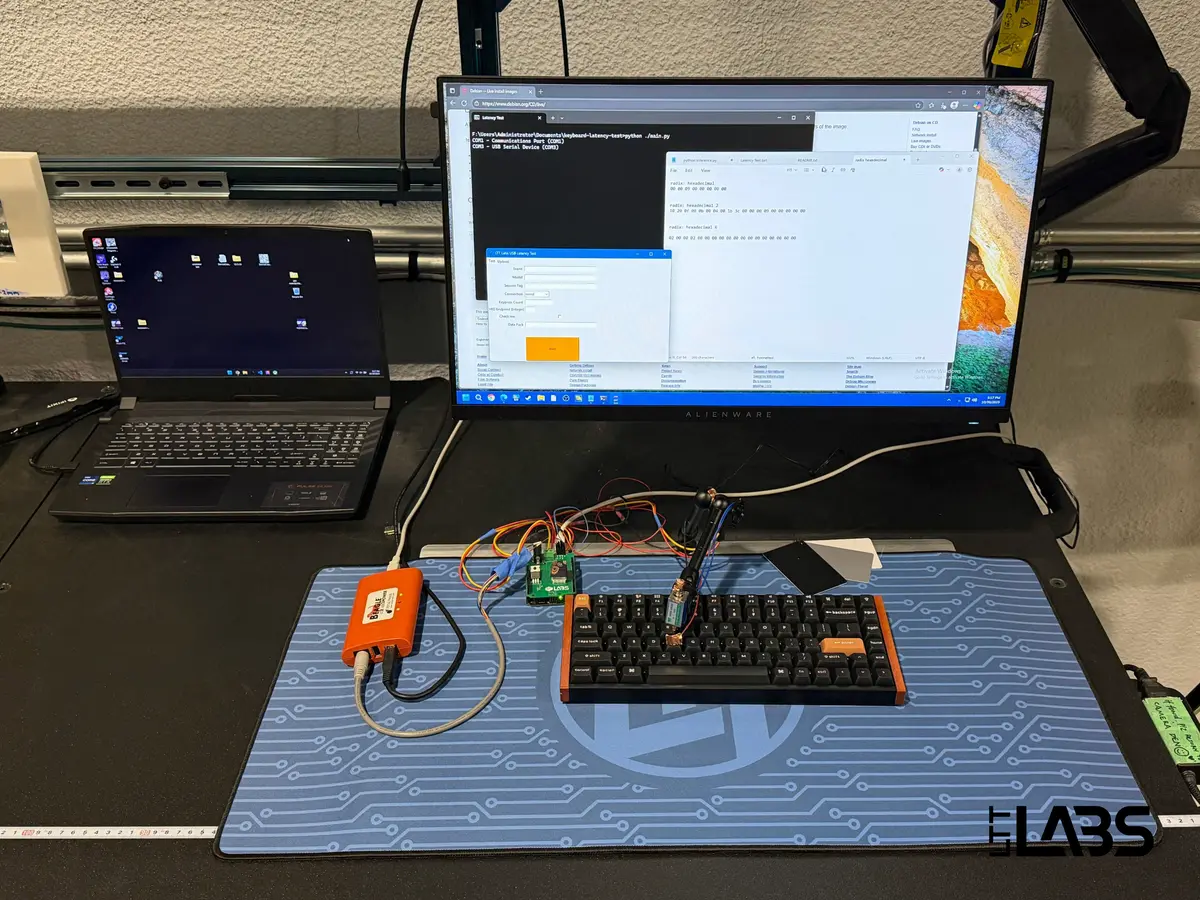
We test each connection type the keyboard supports: wired, 2.4 GHz wireless, and Bluetooth, since latency can change significantly depending on the communication technology.
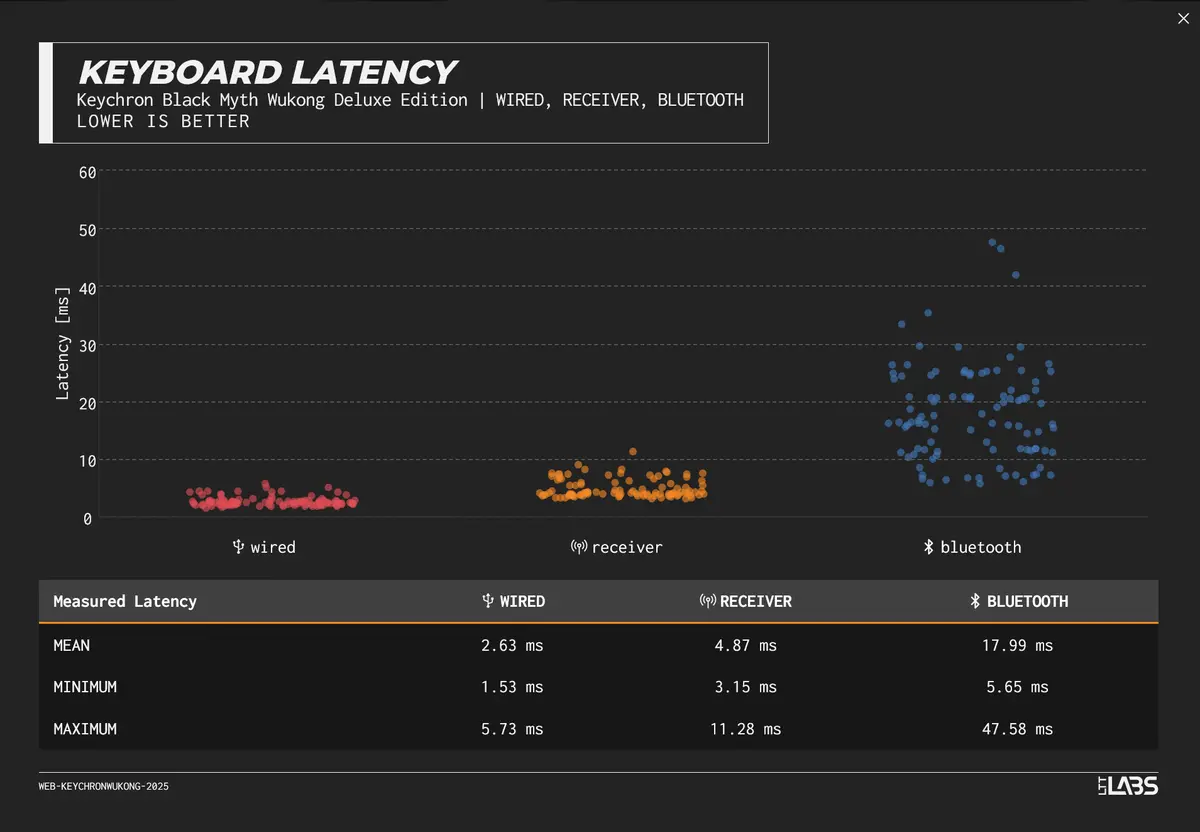
Alongside the maximum, minimum and the mean latency, we also record a video of CS:GO gameplay with a high speed Chronos camera. This does not drive our measurements, but it gives readers a visual sense of what the latency “looks like” in action.
Actuation Testing
Switch feel is one of the most talked about aspects of keyboards, but words like “tactile” or “linear” only go so far. Measurable properties such as the force needed to start moving a key, the distance the switch travels before actuating, and the amount of force required to bottom out can also greatly impact the typing experience.
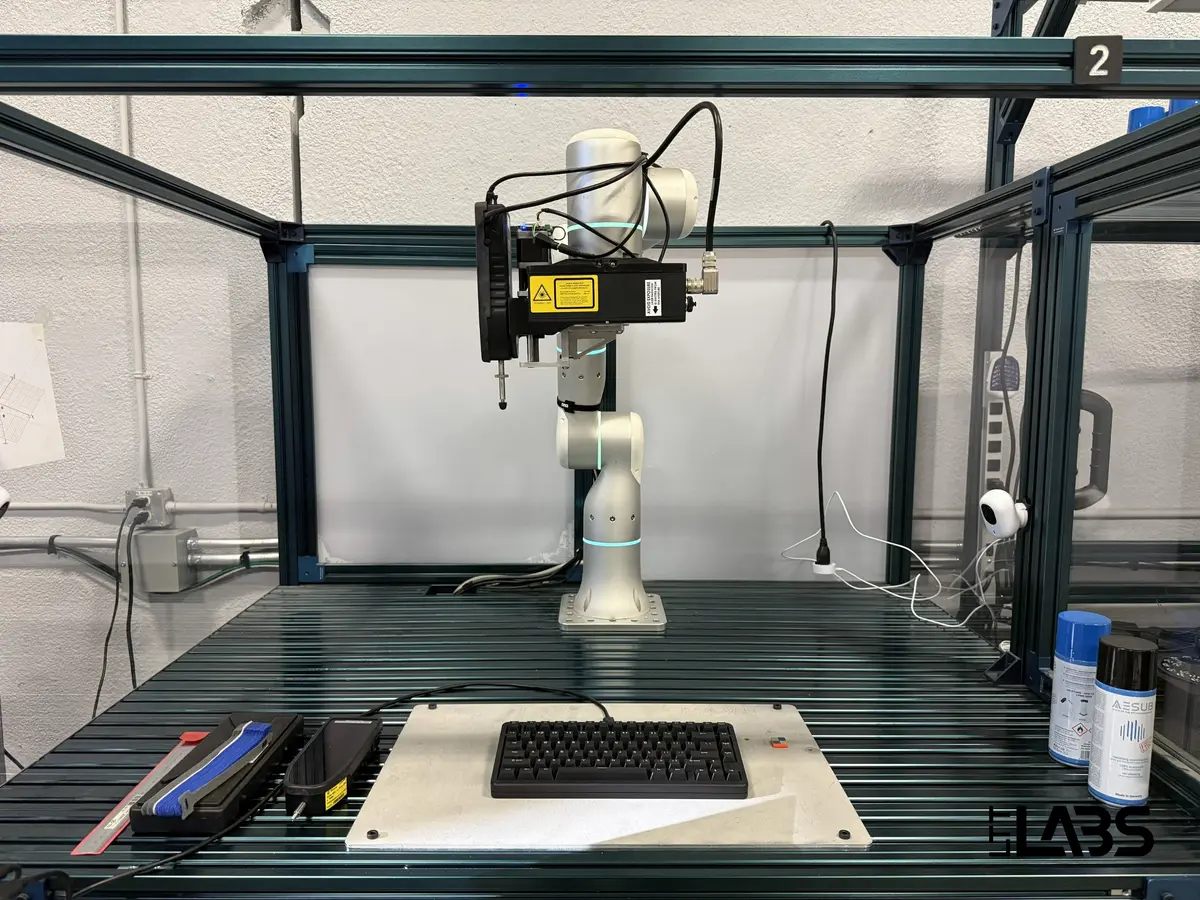
To capture these numbers, we use a dedicated test setup built around three main parts: a Flexiv Rizon 4 robotic arm, an LMI Technologies laser line profile sensor, and a Mecmesin VFG touchscreen force gauge.
The process works like this:
- The robot laser-scans the keyboard to map the position of every key.
- The robotic arm moves the force gauge into place above the key.
- The force gauge’s mechanical “finger” lowers to press the key.
- The force gauge records the force measurements and the position data to give us the travel distance.
- Steps 2 to 4 are repeated for every key.
This setup generates a force-travel curve that shows the starting force, the actuation point, the tactile bump if present, the pre-travel distance, and the total travel distance.
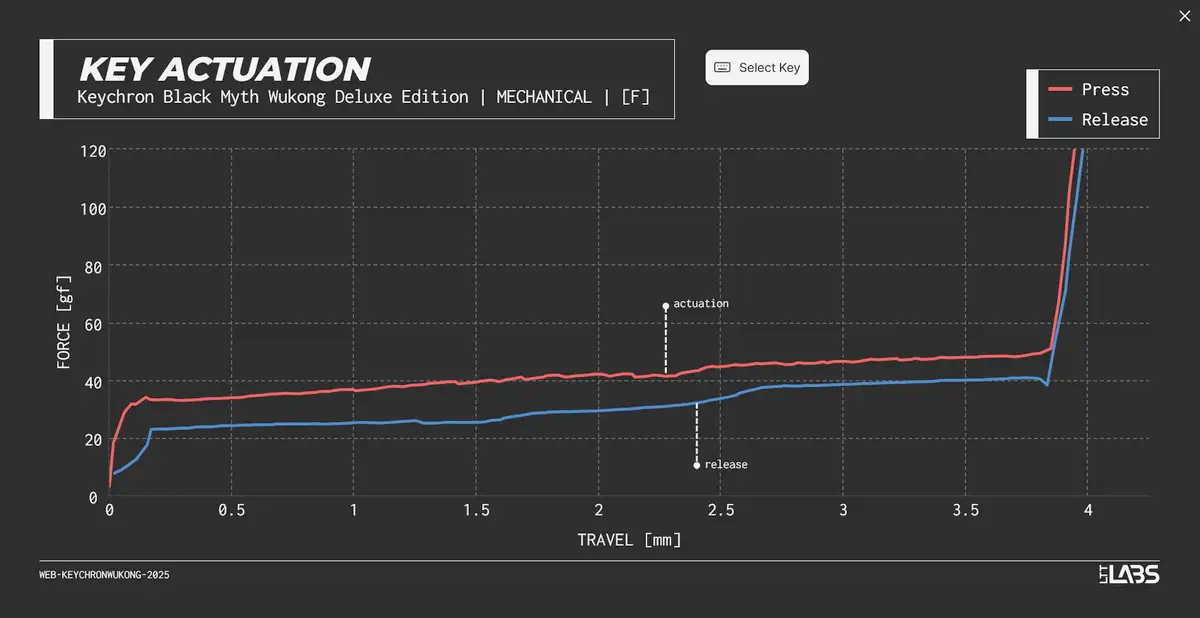
On the Labs website you can view the individual per-key actuation graphs, and they can be compared against other keyboards in our compare tool. To account for variance due to environmental factors that can cause poor measurements, we may repeat the test until the results are consistent and representative.
Input handling Testing - Polling, Rollover, and Ghosting
A keyboard is only as good as the inputs it can reliably deliver. To evaluate this, we measure how often it communicates with the computer (polling rate) and how many simultaneous key presses it can handle (rollover and ghosting).
For polling rate, we use the open source Keyboard Inspector tool. With the software running, we record a typing session and log the maximum rate the keyboard sustains. This test is repeated across all supported connection types. This typically includes wired, 2.4 GHz wireless, and Bluetooth modes.
For rollover and ghosting, we use an online tool by mechanical-keyboard.org and hold down as many keys as possible, tracking how many of them register correctly. A keyboard with NKRO is able to detect the actuation of every key simultaneously. If fewer keys register, we note the limit as 6 KRO, 3 KRO, and so on. We also flag if ghosting occurs, this refers to additional unintended inputs being produced.
These tests together provide a clear picture of input handling. They cover the basics that every keyboard is expected to deliver, like registering multiple keys at once without errors, and reporting inputs consistently. These testing results are not explored in every article as most keyboards perform as expected, but we highlight and explore the results further when one is found to falter. We want to see the exact number of intended inputs, not too many (ghosting), or too few (poor KRO).
Sound Profile Testing
Sound is one of the first things people notice about a keyboard, and it can be just as important as the fit and feel of the keyboard. To capture the sound in a consistent manner, we use a Zoom H1n microphone placed 30 cm above the keyboard which is placed on a desk pad. The tester types the sentence “The quick brown fox jumps over the lazy dog” followed by three presses of each stabilizer key, repeating this cycle three times.
The audio and video are then synced and trimmed down to a short clip that can be played on the Labs website. While no microphone can perfectly replicate what a keyboard sounds like in person, this process gives a reliable reference for how loud a board is and what kind of character its sound has - whether it is a sharp clack, a muted creamy sound profile, or a deep thock.
Exploring the Companion Software
We go through every part of the companion software to see what it offers. This includes layout remapping, lighting controls, macro tools, and notable features. Screenshots are taken of notable settings pages so readers can see the interface as we used it during testing.
A clean straightforward layout is easy to use, unlike unnecessarily hidden menus or confusing workflows that can make simple adjustments frustrating. We also note anything unusual, such as features locked behind accounts, limits on onboard profiles, or missing options that were advertised. The goal is to give a clear sense of what to expect before installing anything.
Reviewer’s Hands-On Testing
Numbers and charts tell a lot, but they do not always capture what it is like to use a keyboard day to day. After the automated tests are complete and the tester notes down some thoughts, the reviewer spends time using the keyboard for some real work.
There could be a myriad of things that the machines do not capture. Some boards take a long time to wake from sleep, switching between devices is painstakingly clunky, key feel differs across the board, larger keys are unstable, or overall build quality of the case is lackluster, and so on.
These impressions are not scored, but they add human context to the data and help frame how a keyboard feels in everyday use.
Known Limitations and Challenges
As thorough as our testing is, there are some limits to what we can measure.
- Latency results are gathered under controlled conditions with debounce time set to the minimum and polling rate set to the maximum, which means real world performance may vary if you use different settings. Some keyboards don’t allow for adjustment of the debounce time at all, those keyboards tend to have higher latency numbers in our testing as the default debounce time is often conservatively high.
- Another limitation is that our latency setup measures the time from the solenoid’s contact with the key, to the USB packet being transmitted. This means the numbers reflect not just the keyboard’s electronic delay but also the time it takes for the switch to physically reach its actuation point. As a result, keyboards with shorter actuation distances can measure faster out of the box. For example, the Sony Inzone KBD-H75 Keyboard measured just over 1 ms at its stock actuation distance, but consistently dropped below 1 ms once we adjusted the actuation point to 0.2 mm. The numbers published on the Labs page are always gathered under the best available conditions (highest polling rate and shortest debounce time and actuation distance if adjustable).
- Sound recordings give a consistent reference but cannot fully replicate how a keyboard will feel or resonate in your own room.
- Force-travel curves capture switch behavior, but the way a switch feels is still influenced by case material, mounting style, and keycap choice.
- We focus on tests that are repeatable and meaningful. Some features, like software stability or long term durability, are difficult to quantify in a short review window. While we note them in our impressions, they are not charted or quantified in the same way as latency or actuation.
“Key” Takeaways
Keyboards are more than just tools for typing. They are instruments for gaming, writing, productivity, and they are canvases for customization. At Labs we combine precise measurements, consistent sound testing, and real use impressions to cut through the marketing claims and show you how each board actually performs.
The goal is not to crown one perfect keyboard, but to give you the data and context to find the right one for you. For example, the author of this article, who likes thocky and creamier sound profiles, recently reviewed the Mchose GX87 which they liked so much that they ended up using it on their desk! Whether you care about every millisecond of latency, the weight of a switch’s tactile bump, or simply how a spacebar sounds at two in the morning, our testing is here to help you make an informed choice.