USB-C Charge Measurement Upgrade
In this article we will get right into our latest measurement device(Infineon CY4500 EPR) and the new slightly more accurate graph that we're able to make.
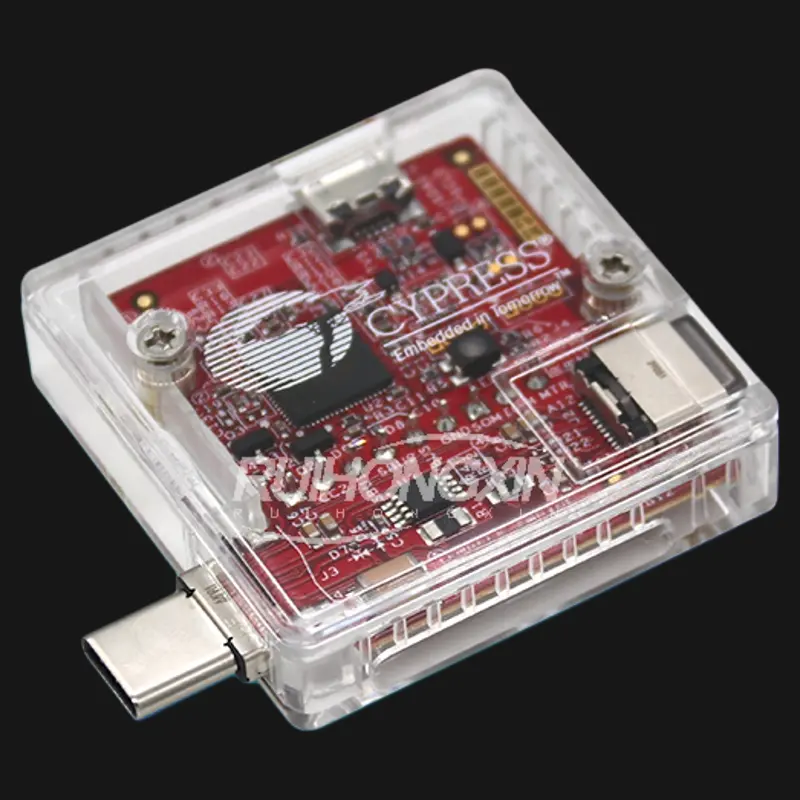
In this article we will get right into our latest measurement device(Infineon CY4500 EPR) and the new slightly more accurate graph that we're able to make that allows us to make a good approximation of charge times and confirm manufacturer claims. We used this to test some claims on the new Pixel 10 Pro lineup.
You may have seen our previous article detailing how we charge test mobile devices. The article alludes to future investigation of USB Type-C(USB-C) testing and monitoring; that future is now, at least partially. Our new CY4500 EPR from Infineon also allows us to directly monitor the USB-C power and communication. It has its own quirks, but I think it can create very interesting and informative visualizations.
Test Setup
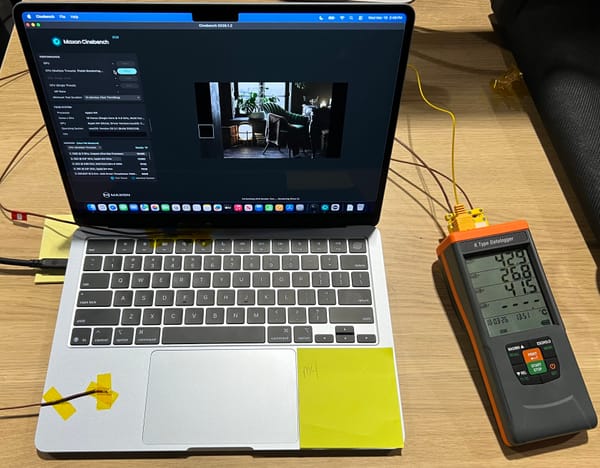
The test setup is exactly as described in this previous article, except that an Infineon CY4500 EPR is placed in between the USB-C cable and the device being charged. This device serves only as a passthrough, operating on the power of the recording computer and only monitoring the USB-C lines, not interfering with them.
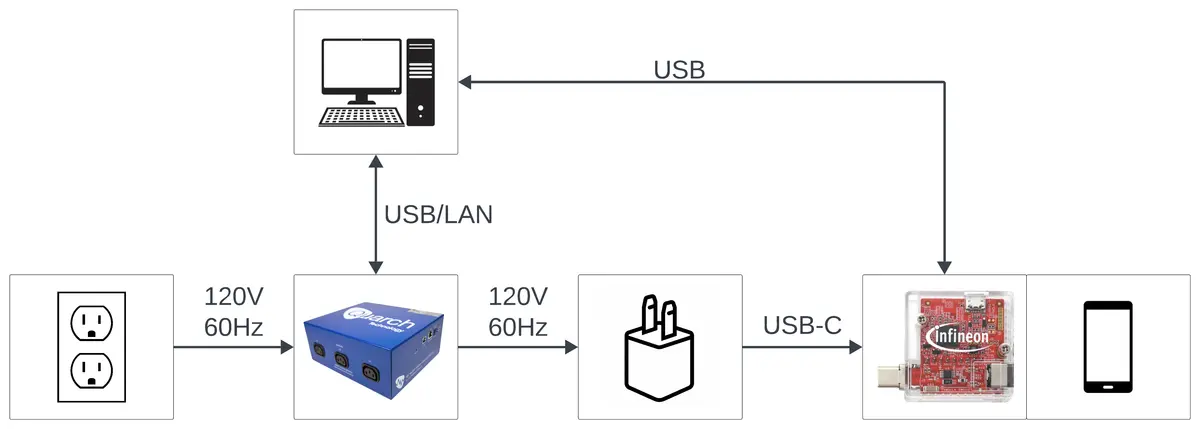
This device, along with the EZ-PD Protocol Analyzer software, allows us to record all of the USB-C Power Delivery(PD) messages, and measure the current and voltage delivered to the device. The EZ-PD software presents most of the information you need and will decode the USB-C PD messages, but it doesn't allow you to export full current or voltage traces like the Quarch Power Studios software allows. This gave me an excuse to write a short utility in Rust to parse the .ccgx3 project file of the EZ-PD software and extract the voltage, current, and power data. This is the data that is used for plotting, while the USB-C PD messages can be used to determine the capabilities of a device.
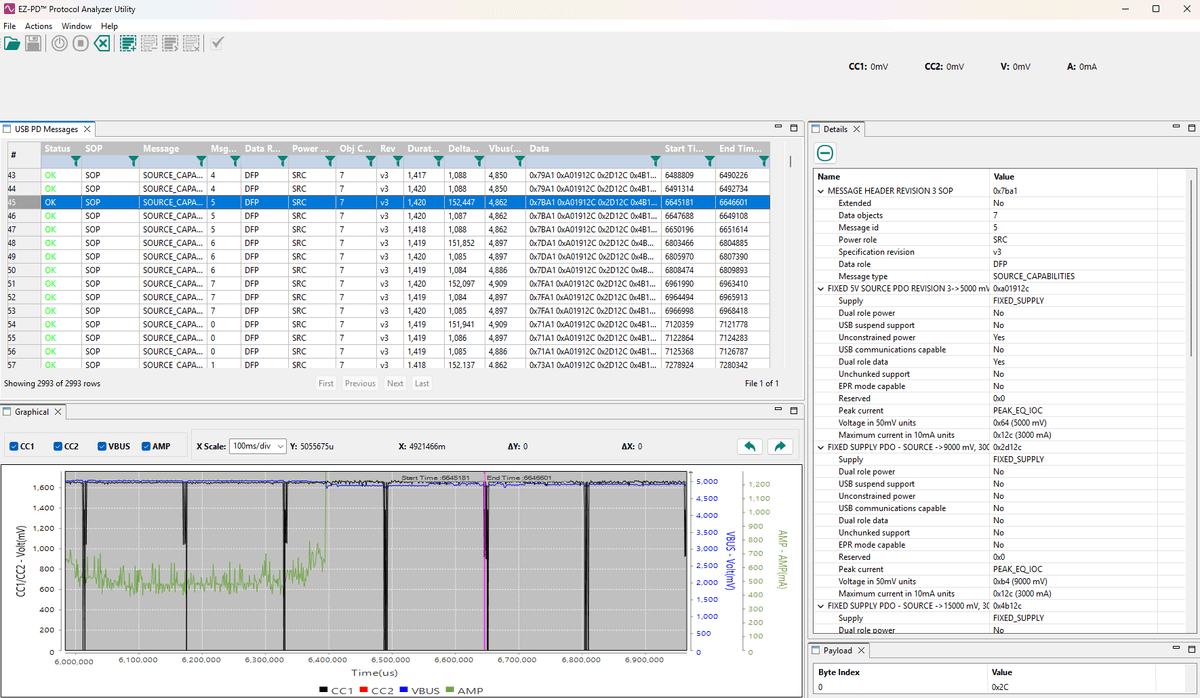
This is not yet part of our "standard" setup and procedure as the CY4500 can only test a single device at a time. However, if this graph is appreciated then this process will be documented and included for notable new phones.
Testing
Testing is still performed as in the previous article, except for the inclusion of a new measurement tool, and having to hit record in another program.
The benefit of the CY4500 is that it allows us to measure the power directly as it is delivered to the device. The measurements aren't affected by losses from AC to DC conversion or cables. This allows our wattage values and [10%, 25%, 50%, 75%, 90%] markers to be more accurate.
This did make me curious about what the difference between measurements might be, so I plotted them.
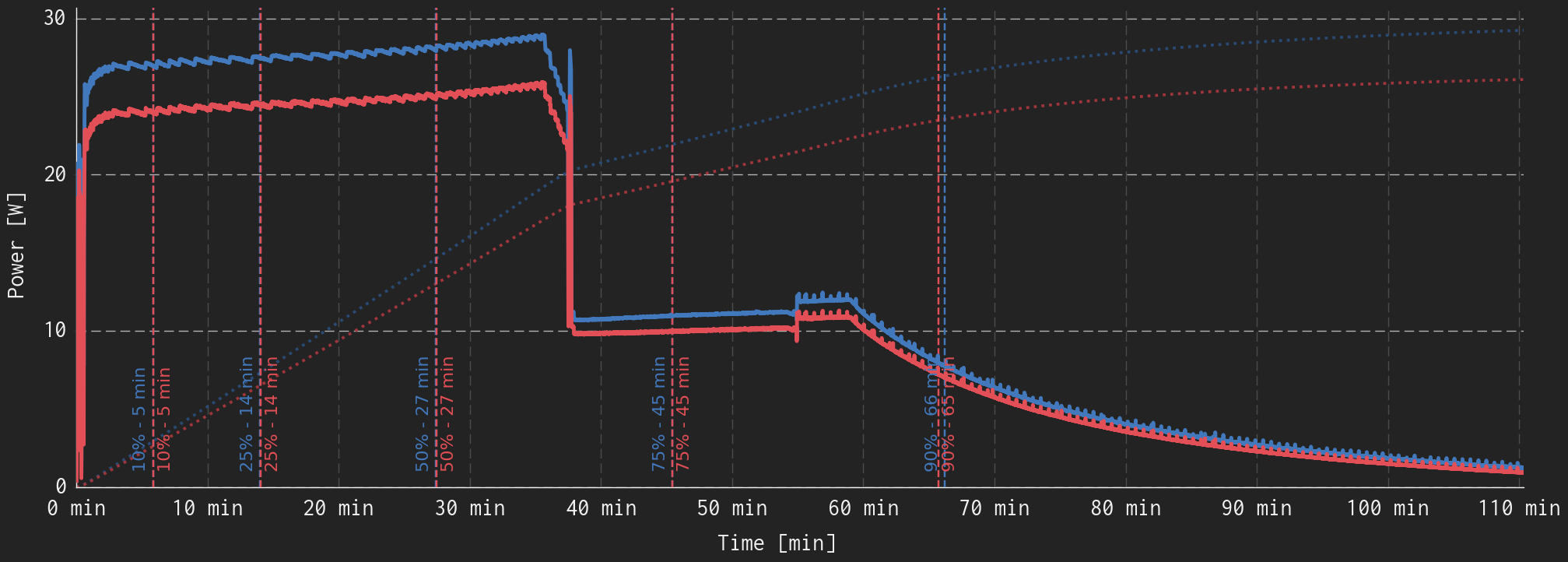
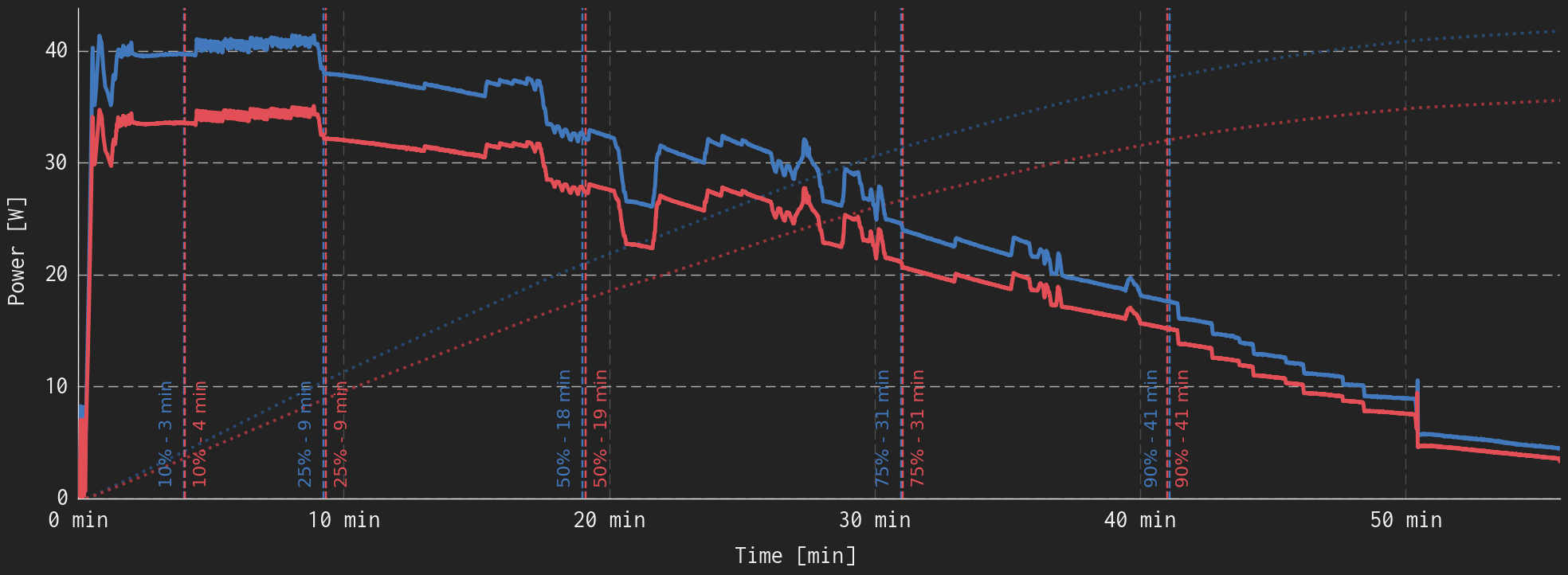
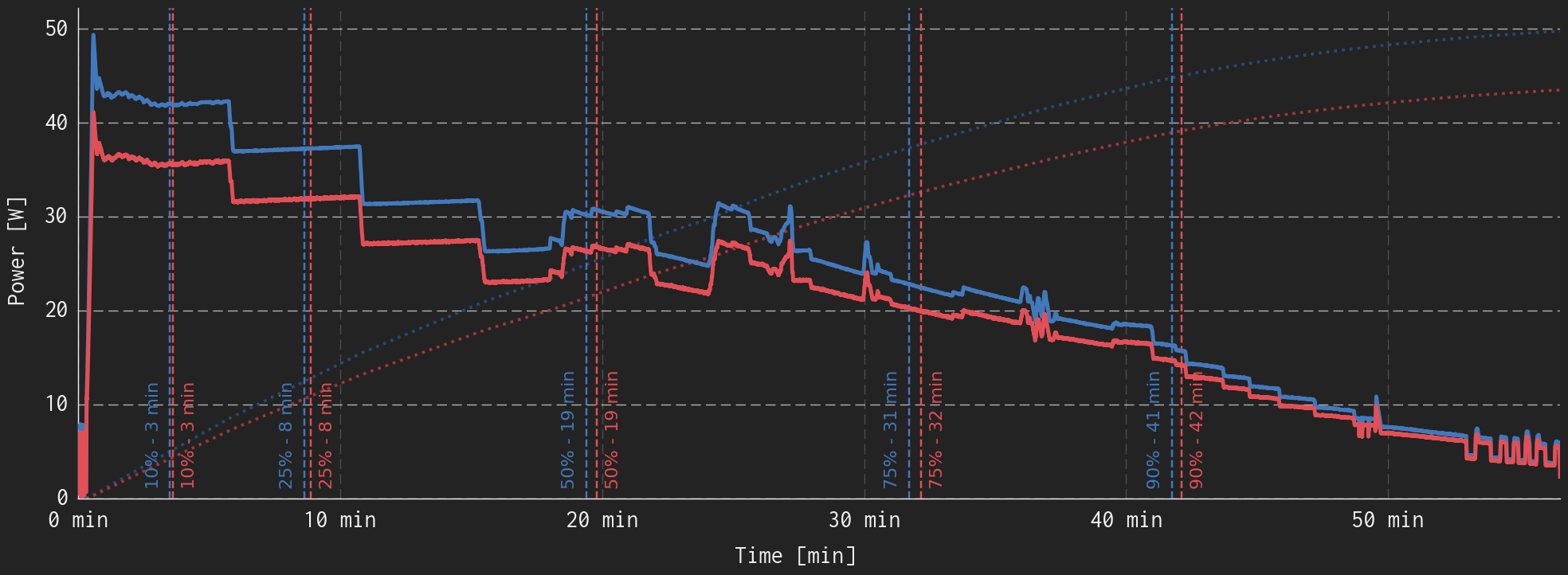
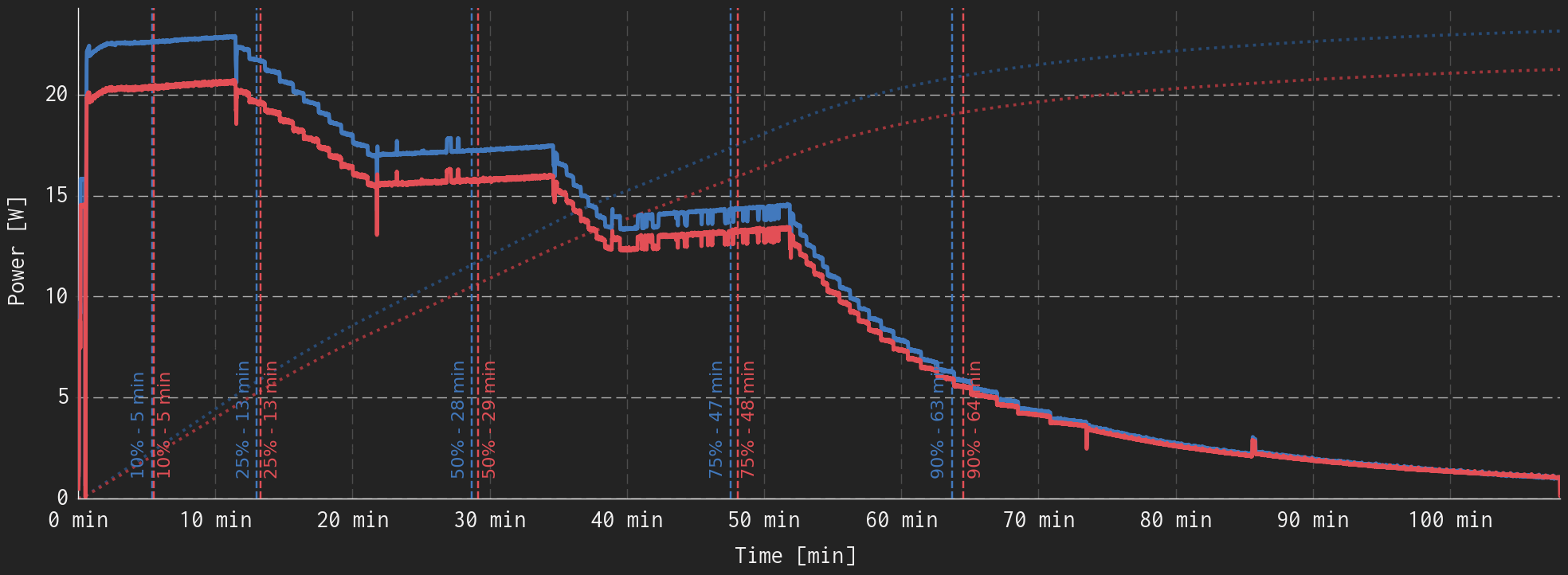
{{Slide}}Quarch PAM vs. Infineon CY4500-EPR Power Measurement Graph - Google Pixel 10 Pro, 45W Charger{{/Slide}} {{Slide}}Quarch PAM vs. Infineon CY4500-EPR Power Measurement Graph - Motorola RAZR 2025, 80W Charger{{/Slide}} {{Slide}}Quarch PAM vs. Infineon CY4500-EPR Power Measurement Graph - Motorola RAZR 2025, 45W Charger{{/Slide}} {{Slide}}Quarch PAM vs. Infineon CY4500-EPR Power Measurement Graph - Samsung Galaxy S24, 45W Charger{{/Slide}}
There is a lot going on in these graphs, so if you'd like the easy way out, my conclusion is that the Quarch AC PAM(AC power measurement) and Infineon CY4500 EPR(USB-C power measurement) perform very similarly when calculating the time to deliver a certain percentage(10%, 25%, ...) of the battery's energy. Otherwise, here is some explanation:
- All of the data in blue was measured/calculated with the Quarch AC PAM, and the data in red was measured/calculated using the Infineon CY4500.
- The main traces of the graph show the charging wattage over time. The blue line is the power being delivered to the AC adapter, while the red line is the power delivered to the device. The difference between the red and blue lines represents the instantaneous wattage that is being lost in AC to DC conversion.
- The dotted traces going from the bottom left to the top right show a scaled representation of the device's charge state over time. It does not use the main scale of the plot, instead, the peak represents the total energy delivered to the device, nominally a 100% charge. The vertical difference between the red and blue dotted lines represents the portion of the energy lost in AC to DC conversion(and cables). This trace is often used to portray battery charging because the slope of the line represents the rate at which the battery is charging, and changes in slope/shape are often used to identify changes in charging mode(constant current vs. constant voltage).
- The dashed vertical lines indicate times/durations along the x-axis where the energy delivered since the start of the test is the stated percentage of the total energy delivered to the device(10%, 25%, 50%, 75%, 90%). The difference in horizontal position between these sets of two lines is the error introduced to the statement "It took X minutes to reach Y% charge." caused by measuring before(vs. after) the AC adapter. In my testing of some devices and chargers, I have found the difference to be negligible, within 1-2 minutes, justifying the use of the Quarch AC PAM data for the estimation of charge time.
New Graph - Now for a Nice Version
This is the new graph that we can generate with the CY4500. It is remarkably similar to the previous Charge Curve graph, except that it is now more accurate and includes a charge capacity trace.
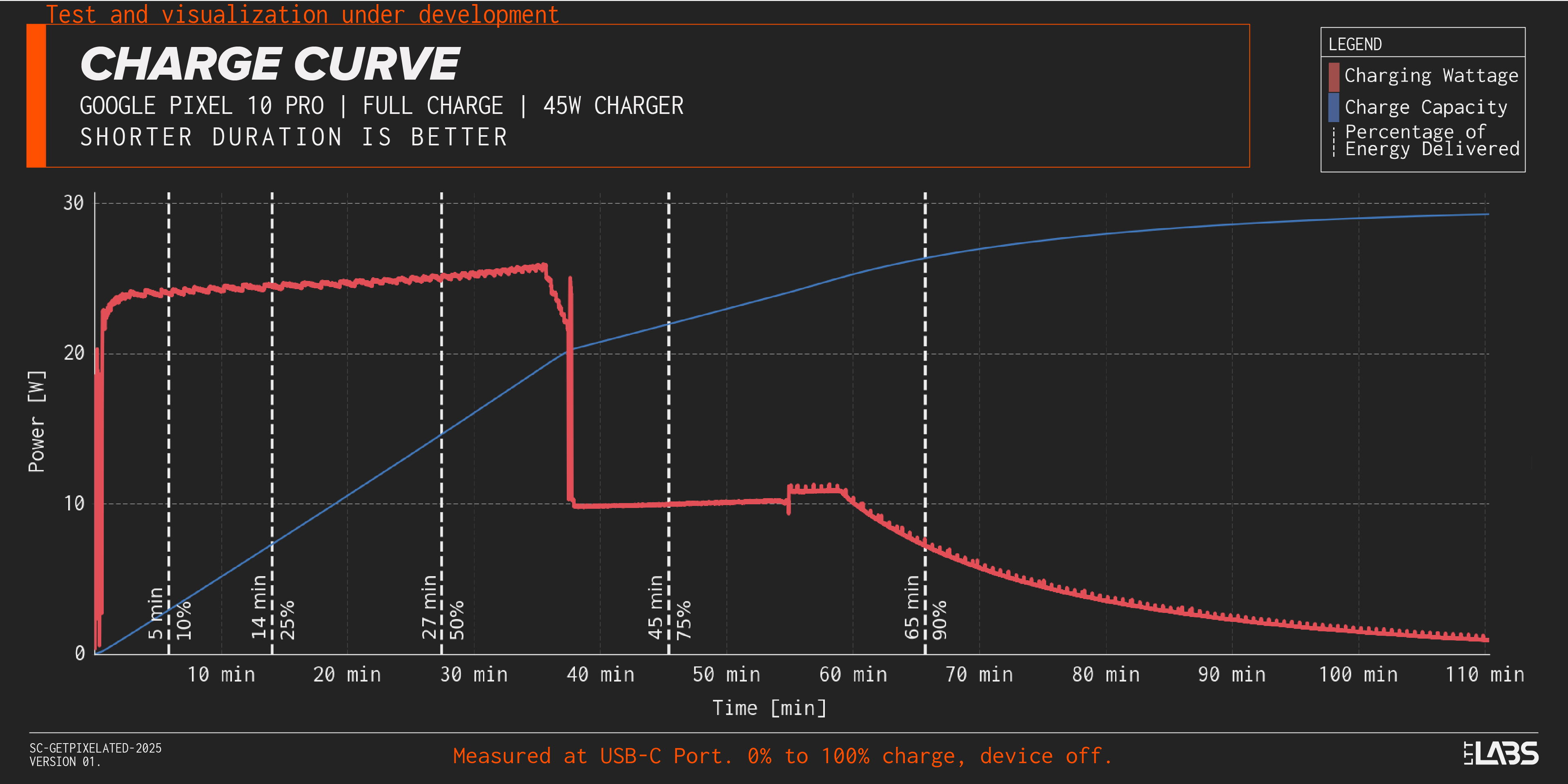
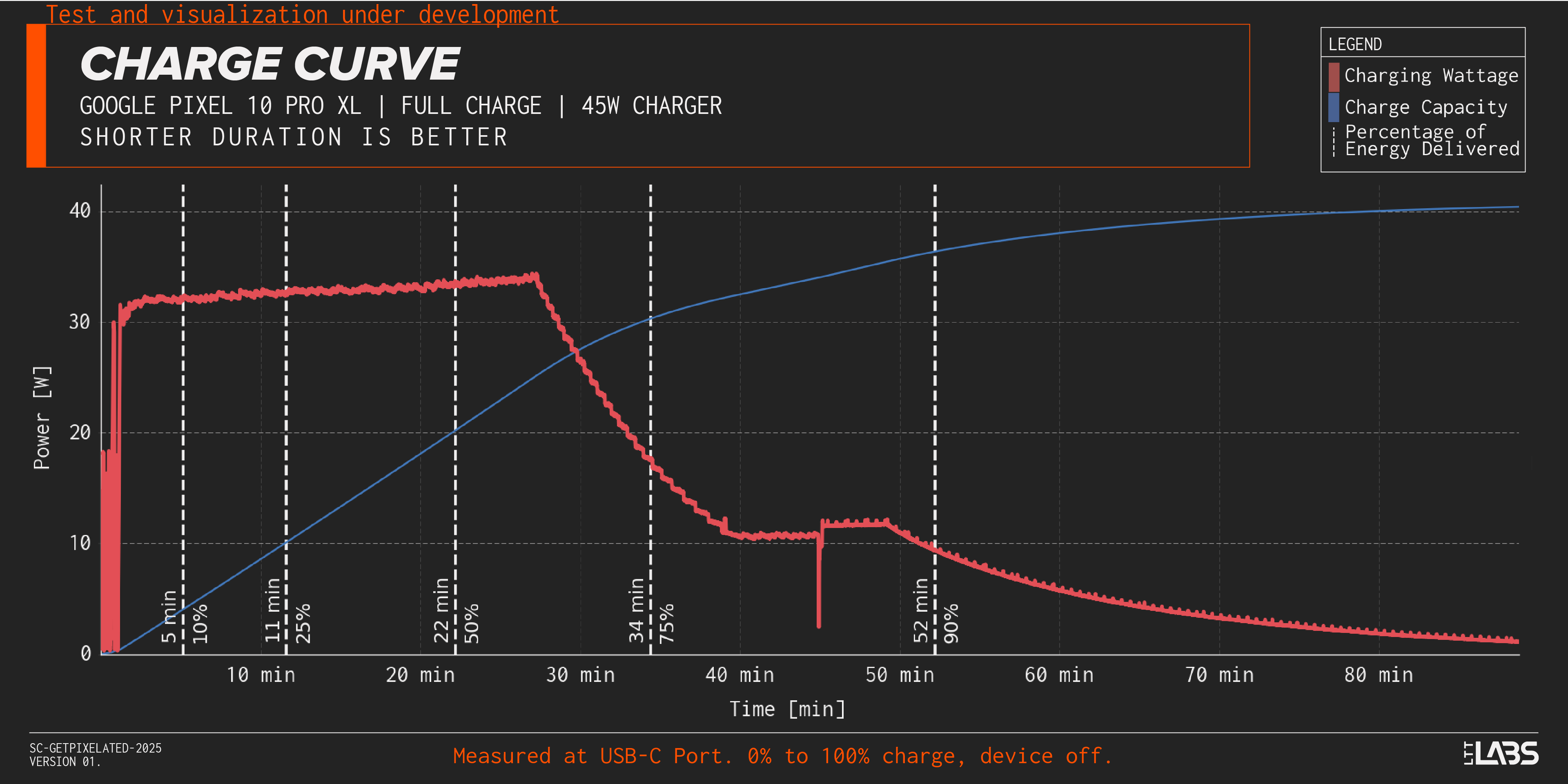
{{Slide}}Google Pixel 10 Pro Charge Curve - 45W Charger{{/Slide}} {{Slide}}Google Pixel 10 Pro XL Charge Curve - 45W Charger{{/Slide}}
Hopefully this graph is at least slightly more clear than the ones above. I've removed all of the Quarch AC PAM data and the data presented is measured with the CY4500, directly at the phone USB-C port. The descriptions from above(and in the previous article) still apply here, the main red trace is the wattage delivered, the blue trace is the charge capacity, and the dashed white vertical lines represent different times and energy delivered percentages as labelled.
For this exact example, we can see that the Pixel 10 Pro is able to get up to 50% in 27 minutes, well on its way to the claimed 55% in 30 minutes(confirmed), and the Pixel 10 Pro XL is able to get 75% in 34 minutes, also providing support to their claim of 70% in 30 minutes(not quite confirmed, but close). We are able to adjust the percentage intervals shown,(as in linked images) but have kept these ones consistent as a reference point.
If you have any comments or suggested changes to the above, please let us know!