Why Are These Called Graphics Cards?
Not every graphics card does graphics anymore, and our RTX 5090 vs H200 NVL showdown proves some GPUs are really just AI machines in disguise.
Thanks to Bartowski for his input on this project!
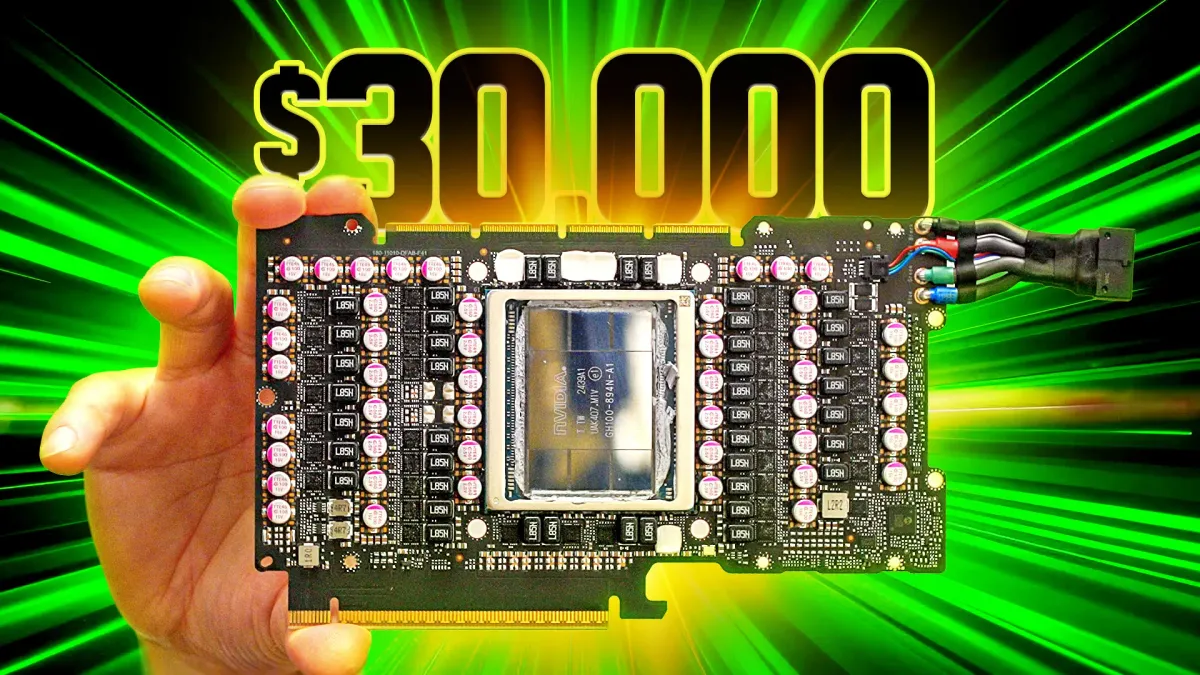
In a recent video we set out to help Linus showcase the absurdity that is a >$30,000 data center class graphics card.
We were loaned an H200 NVL for our experimentation and teardown; brave. During the course of the teardown Linus said "THIS 'Graphics Processing Unit' has functionally ZERO support for GRAPHICS processing. No Vulkan, No DirectX, and No OpenGL speak of."
He has a point, why are they still called GPU's if they can’t you know… graphic. In this article I’ll explore this question through the lens of our RTX 5090 vs. H200 NVL matchup using results that didn't make it into the video. I’ll show you why the RTX 5090 versus the H200 NVL isn’t a comparison between two graphics cards, but between two completely different components.
This article is best paired with a watching of the video, so if you haven't yet, go check it out! We'd also love to hear your thoughts through the LTT forum.
Just Based on the Specs
The H200 NVL is built around a Hopper GH100 chip, while the RTX 5090 has a Blackwell heart. It also nearly has a 30% core count advantage over the H200 NVL, not to speak of the architectural improvements over the Ada Lovelace (RTX 4000 series) era technology of Hopper.
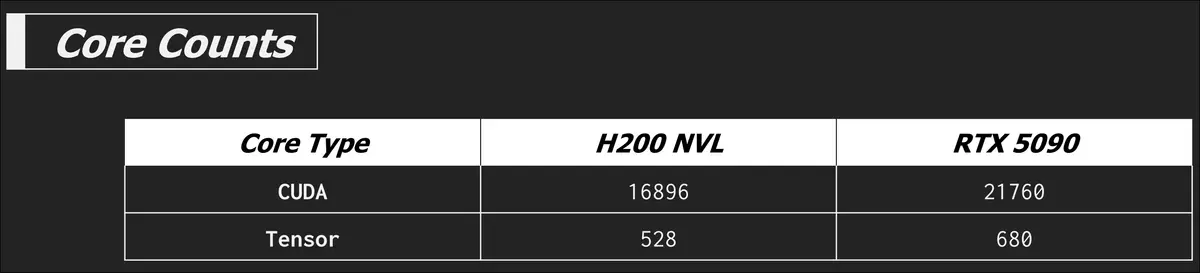
Memory bound tests aside, the RTX 5090 looks like it should beat the H200 NVL in many tasks... and it does but we'll go over the nuance of that in a bit. So what really sets the H200 NVL apart is when we bring memory back into the picture. The H200 NVL is equipped with HBM3e while the RTX 5090 is sporting GDDR7.
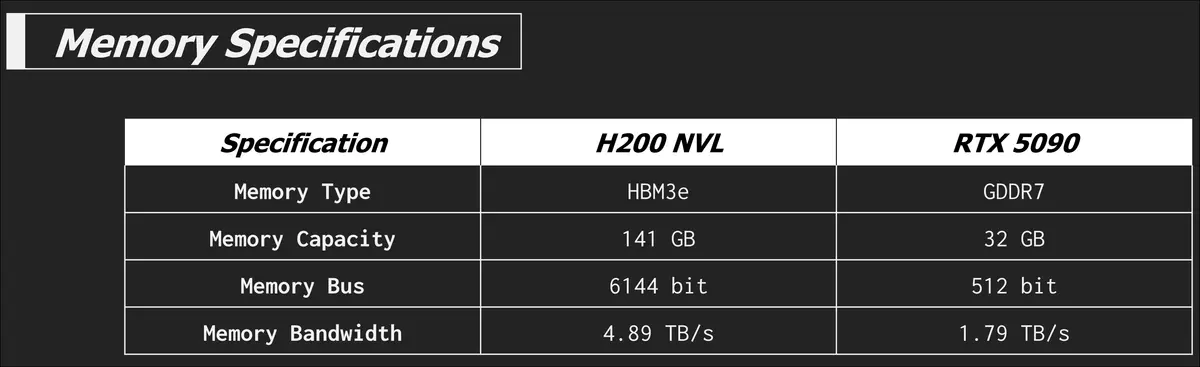
Damn that's some amazing memory bandwidth. The video explains HBM3e already so I'll save myself the typing. The insane memory capacity and bandwidth of the H200 NVL is the main feature that incurs that hefty price tag. Let's go into some of the actual results starting with some large language model (LLM) inference tests.
Testing LLM inference
Using a desktop application such as LM Studio or Ollama to benchmark LLM performance isn't super accurate or traceable, but they are better interactive and visual demonstrations on camera than a terminal brr'ing away. Knowing this, we took the time to do more deliberate testing using llama-bench. With this tool there are three types of tests you can do, prompt processing, text generation, or a separate test which is a combination of the two. However llama-bench doesn’t represent how the H200 NVL would likely be used in a real world deployment. Normally these cards would be deployed in groups that serve multiple users concurrently. Llama-bench only runs one request per test simulating a single user.
We also recognize that almost no one with a H200 NVL would be using llama.cpp for inference, there are higher performance tools like VLLM and sglang, but the llama.cpp project is good enough for our demonstrations and testing.
Before we get into test results, it is important to understand two technical mechanics of LLMs and why compute and memory are so important to our ability to ask an LLM about sheep.
Prompt processing and tokenization
Prompt processing is pretty much what it says, it's the first step the model takes before starting to form its response. Say you want to know more about sheep sweat glands, (they must get hot with all that wool right?) and have a prompt to ask your LLM, "How do sheep sweat glands work with such a large wooly coat?".
This prompt is first tokenized, or turned into numbers to speak the language the LLM's can understand; math. Tokenization is the process of turning a whole sentence into a series of tokens, which can take on many different forms, but in LLMs are often small groupings of letters or entire words. These groups are then represented as numbers.
Using OpenAI's tokenizer demo we can see what this looks like.
You can also see how tokenizers from different models work using The Tokenizer Playground from HuggingFace.
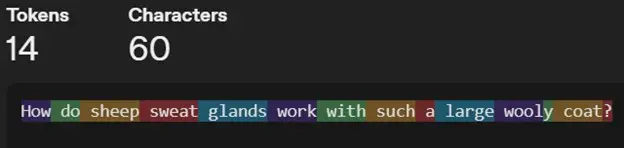
These tokens are then turned into embedding vectors and passed through each layer in the model to create a key-value (KV) cache. The KV cache is important for text generation, and we'll explain that next, but first a note. This is all work that is required before new tokens are generated. This part happens in parallel meaning that this stage is more compute bound than memory bound. A hint that the higher core count plays a larger role in prompt processing tests than the memory bandwidth does.
It is far beyond the scope of this article to explore tokenization and embeddings in depth. If you’re intrigued and would like to learn more, I really like the article A Beginner’s Guide to Tokens, Vectors, and Embeddings in NLP by Sascha Metzger to explain how LLM's can understand words. By this point in this article, all I need you to remember is that tokens are the beginning of how LLM's start to understand human language.
Text generation and KV Cache
Once the prompt processing has been completed the model can start generating some text. Text generation is sequentially autoregressive, meaning that the next token is predicted based on all the previous tokens; your prompt, and any tokens it has already generated. This all happens sequentially one token at a time, so in this phase it flips between being compute bound and memory bound as it is frequently accessing and writing to the KV cache.
If we didn't have a KV cache every new token would require re-computing all the previous tokens which would slow down the process considerably. The KV cache is a memory of the math done for all the previous tokens so we don't have to waste resources doing it again. The KV cache grows as each newly generated token is added. The KV cache is a large part of the VRAM requirements alongside the model itself for inference. I really like the video on the channel EfficientNLP "The KV Cache: Memory Usage in Transformers" to explain this topic, though I will warn you, thar be maths ahead! The important thing to remember is that the KV cache being in VRAM and token generation being sequential makes text generation predominantly memory bound.
Okay with some of this explanation of tokens and KV cache out of the way, let's look at some test results.
The inference engine that could
Given what we now know, the RTX 5090 should technically win when compute is king. And this is true when the model fits comfortably in VRAM. The first model we will test is the 7.95GB Meta-Llama-3.1-8B-Instruct-Q8_0.gguf, easily sliding into the 32GB of the 5090 and the spacious 141GB of the H200 NVL.
Prompt Processing
llama-bench -m ./models/meta_llama/Meta-Llama-3.1-8B-Instruct-Q8_0.gguf -n 0 -p 2048 -b 128,256,512,1024,2048 -mg 0 -t 8 -o json
This command runs the model with zero token generation and a prompt size of 2048 tokens at a range of different batch sizes. Batch size is the maximum number of tokens that are processed together in a single forward pass through the model. It affects how the prompt is chunked for parallel processing. In this test the metric is the number of tokens processed per second, not generated per second.
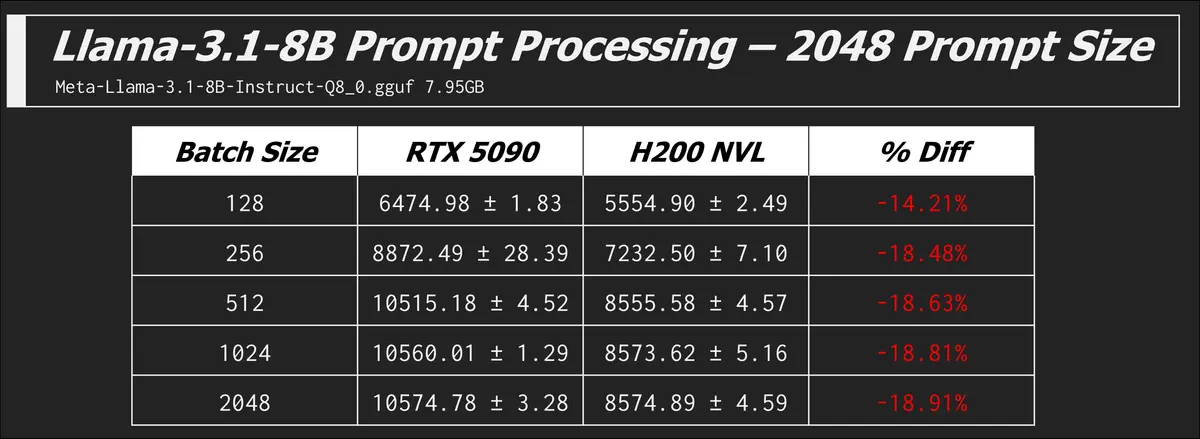
We see that the RTX 5090 is winning the compute race, but eventually both cards hit their ceiling and aren't getting any faster with increased batch size. The GPU is fully utilized at these batch sizes.
Context windows
To paint a picture of how many tokens 2048 really is, here is the first paragraph from Charles Dickens "Tale of Two Cities" in OpenAI's token counter.
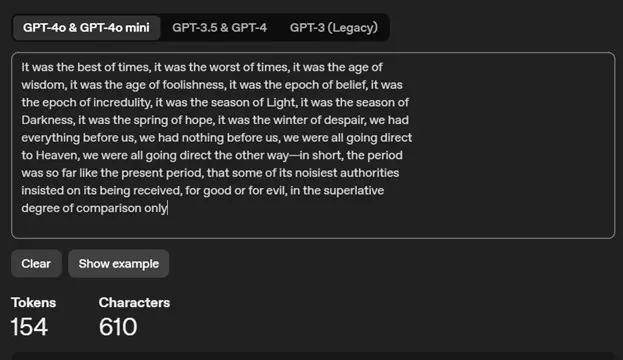
The size of prompt a model can handle is determined by its context window, or its "working memory". The context window is the maximum amount of tokens that the model can consider when generating a response. The input prompt takes up a part of that context window.
So a prompt size of 2048 for this benchmark is actually pretty large. This particular Llama-3.1 model has a context window of 128K tokens so we got some room to grow. What happens if we increase the prompt size?
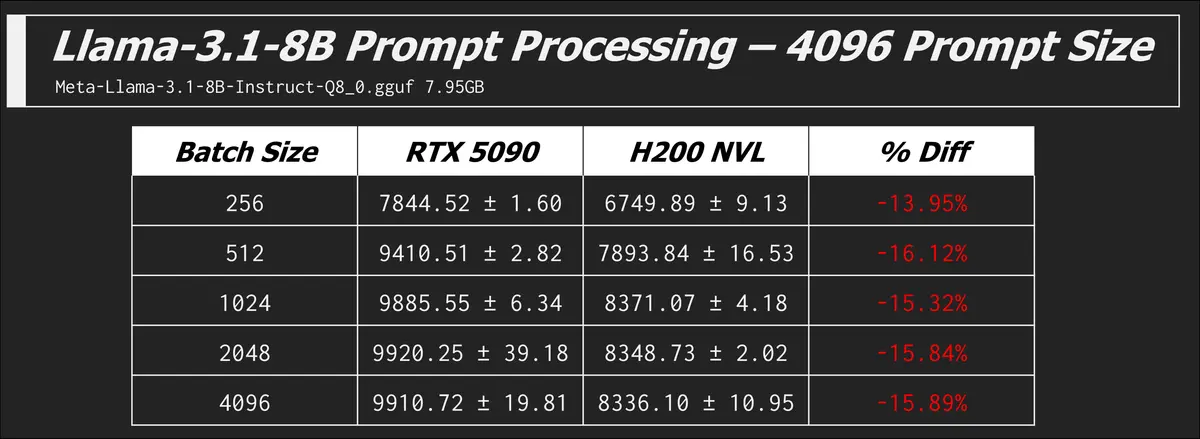
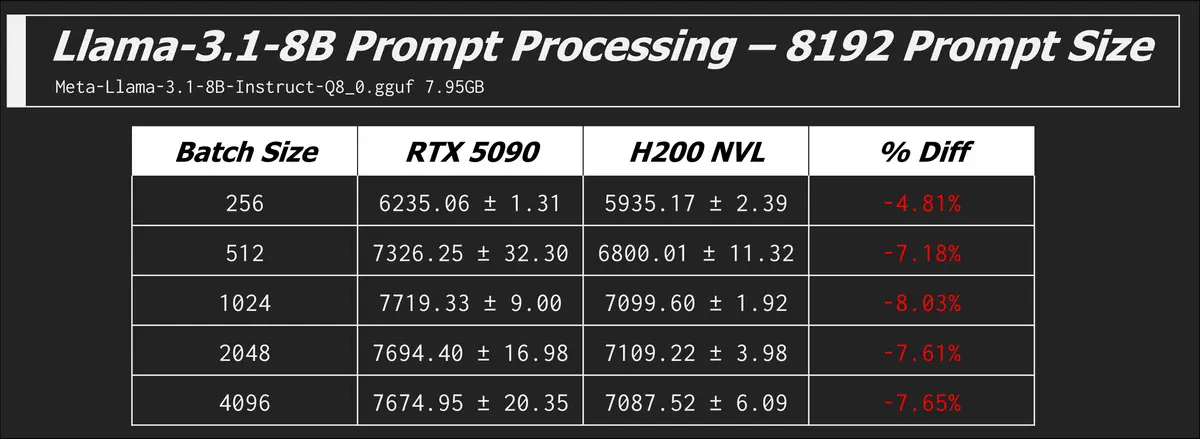
The RTX 5090 finally caved and errored out at a prompt size of 74k, so the 32GB does go a long way when you load a 8B model and leave some of that VRAM for your context window. You could load a larger (more parameter model) but you are trading a potentially more capable model for smaller conversations.
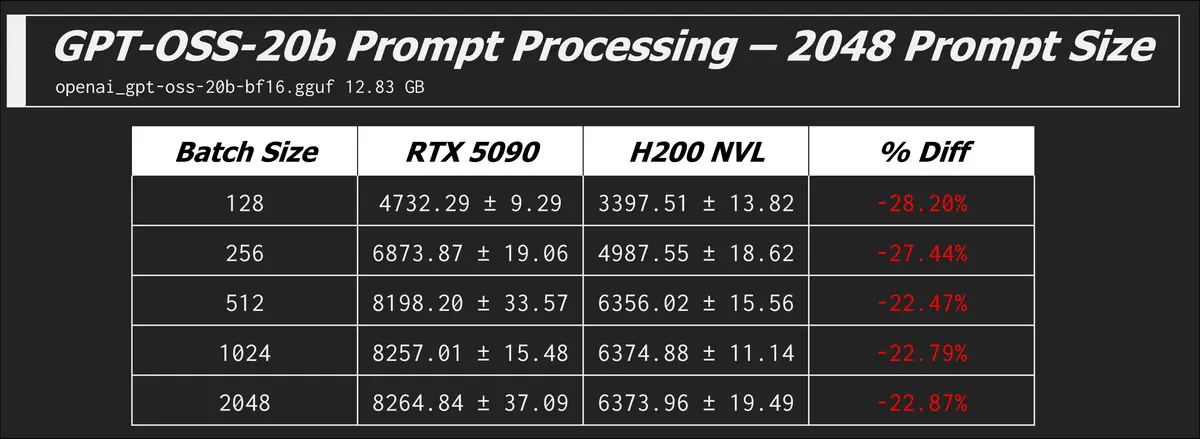
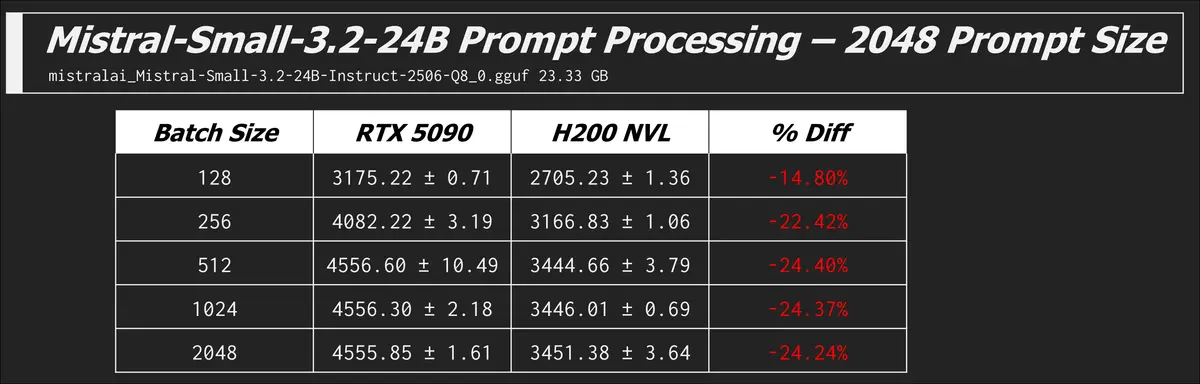
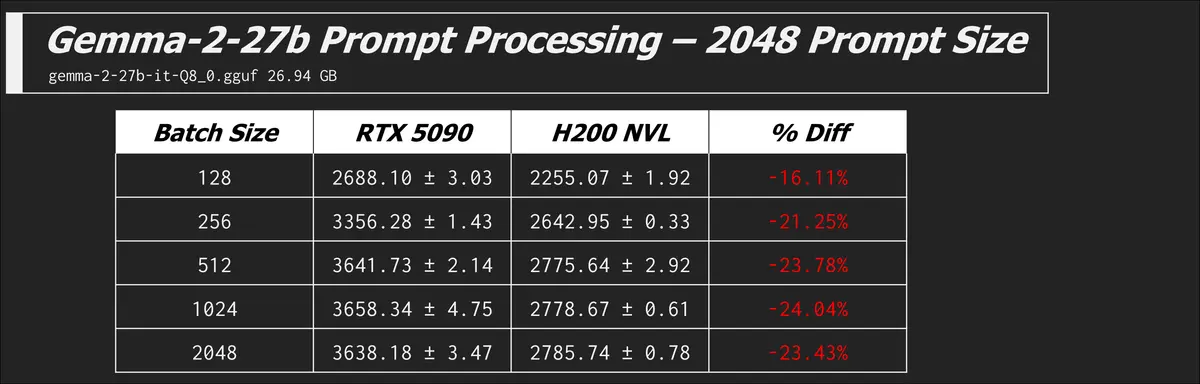
Here are some other models and prompt processing results which all tell the same story of the 5090 beating the H200...
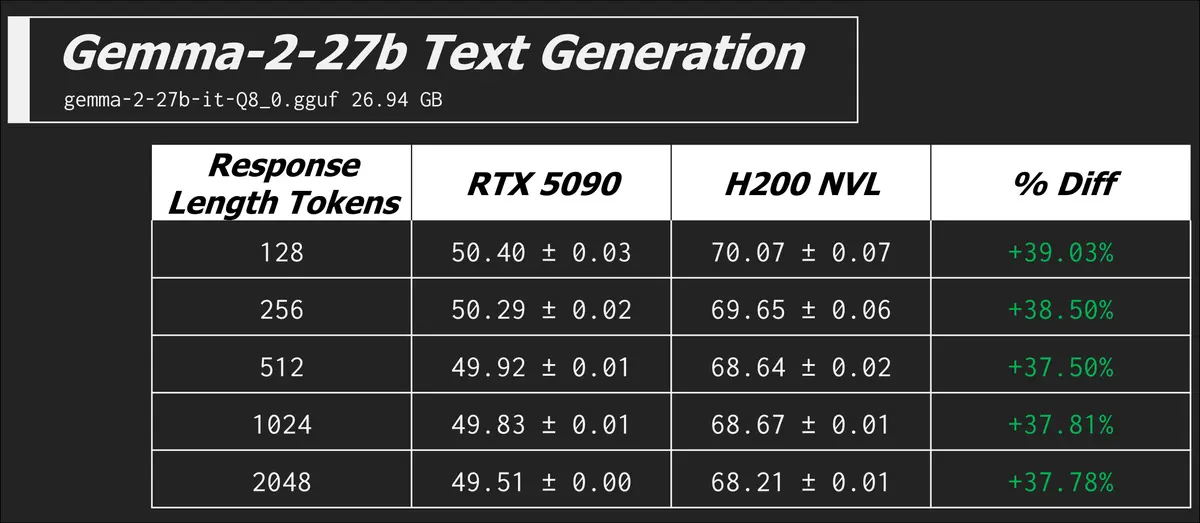
Text Generation
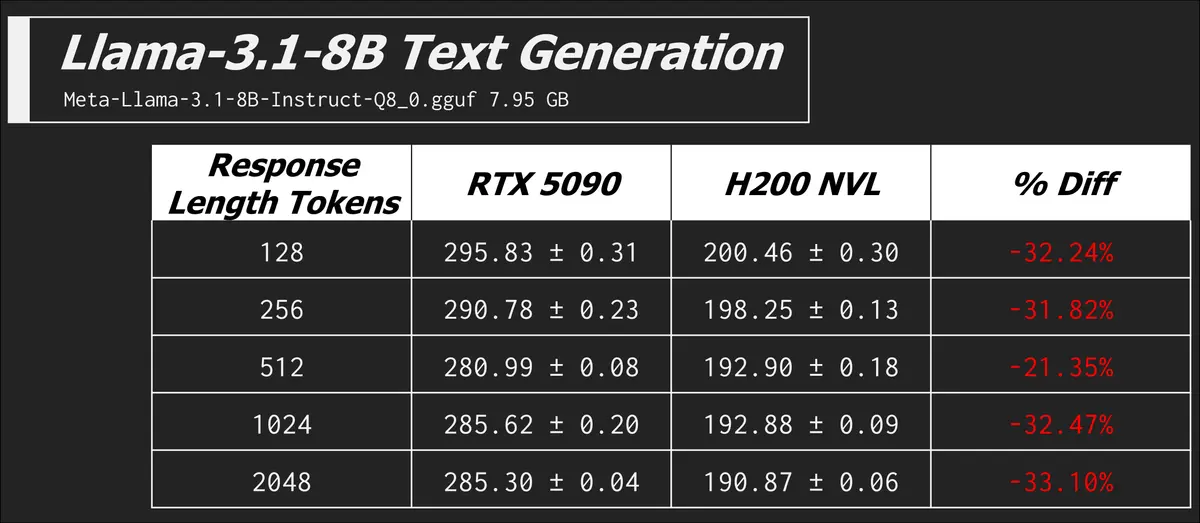
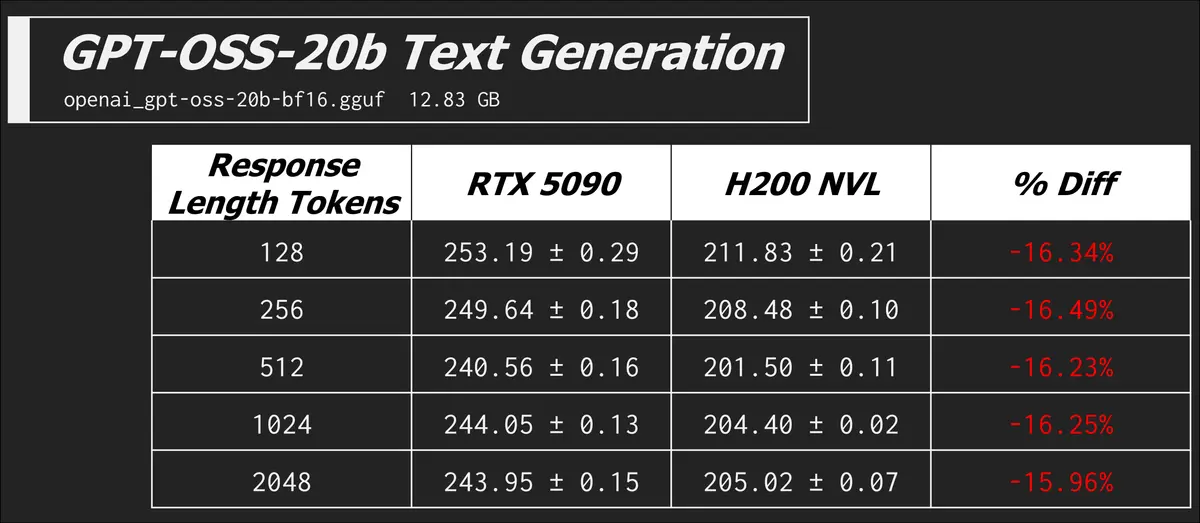
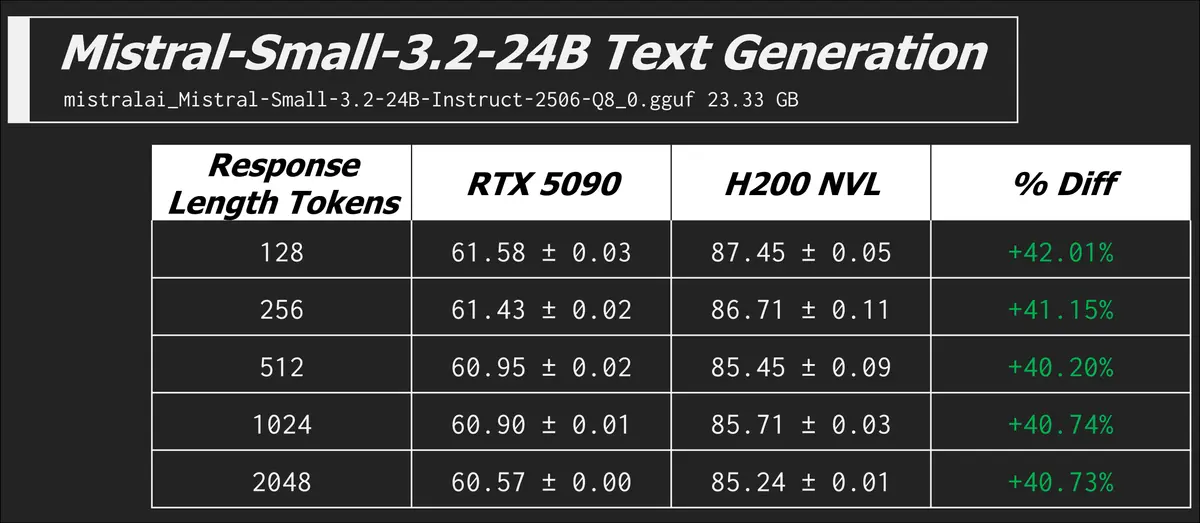
I already did lots of explaining up above, so we'll get right into the results here.
llama-bench -m ./models/meta_llama/Meta-Llama-3.1-8B-Instruct-Q8_0.gguf -n 128,256,512,1024,2048 -p 0 -b 512 -mg 0 -t 8 -o json
In this command we have zero prompt processing, but a range of different token counts in the expected generated response. The metric is now the more familiar tokens generated per second.
Training
We did also run some training benchmarks on the RTX 5090 and H200 NVL which we’ll cover in this section.
We tried fine tuning the following models:
- TinyLlama/TinyLlama-1.1B-Chat-v1.0
- mistralai/Mistral-7B-Instruct-v0.3
- microsoft/Phi-3.5-mini-instruct
We used the tatsu-lab/alpaca data set for all these tests.
When we say we trained these models on a dataset it's more accurate to say we trained them using a parameter efficient fine tuning technique known as low-rank adaptation or LORA. Simply put, instead of re-training every parameter out of the billions that make up our target language model, the algorithm we use cleverly decides to only train a few million of them. Partially fine tuning models like this is largely what people mean when they say they trained a model. Some do go the extra-mile and fully fine-tune a model, affecting every parameter, however no one at home starts from scratch. Training fresh base models takes an unfathomable amount of data and MILLIONS of hours across hundreds of thousands of cards like the H200.
Even fine tuning using clever tricks and optimizations can take days for enthusiasts with too much money, so in our tests we used settings that cut the training time to reportable durations. Our training experiments didn’t produce any meaningfully smarter models, but we did enough to get a picture of how fast each of these cards COULD take if in the hands of a seasoned enthusiast. There are many factors that can contribute to training time, some factors are hard constraints, a large number of parameters, higher model precision, more training epochs, or a too small batch size (when the GPU VRAM is insufficient for a large one) will inevitably increase training time. Other factors, such as optimizer choice, learning rate, and parallelization strategy (for multi-GPU cases), are tunable and often require experimentation. Sometimes poor choices make it hard for the model to converge, or cause the training loss to plateau, which makes it take much longer to reach the desired performance.
The three variables we changed during testing were the precision, batch size, and epochs. The precision determines how many bytes we use per parameter and the batch size is how many samples of the dataset are used in each training step. Epochs is the number of times the model goes through the entire dataset.
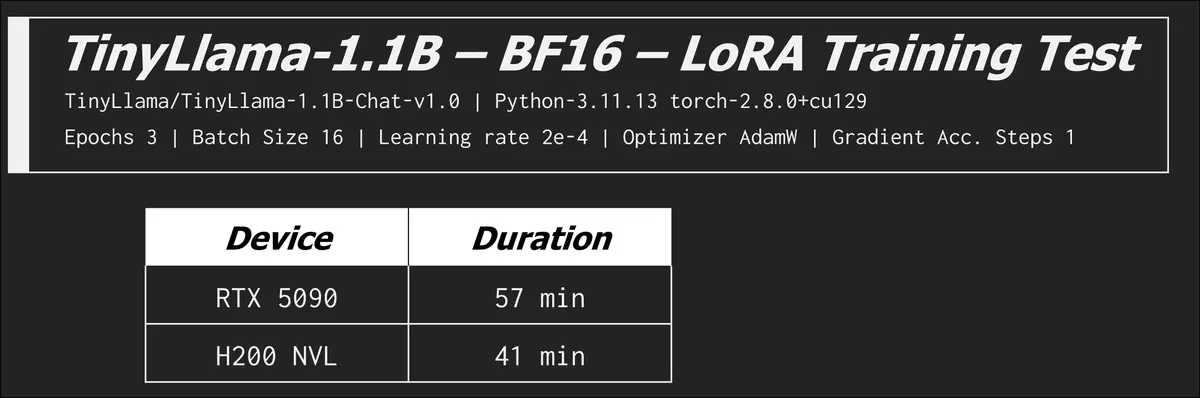
Okay cool, now we see what the H200 NVL is good for and that memory bandwidth is now overshadowing the compute difference between itself and the RTX 5090. This was a tiny model, let's try something a bit larger.
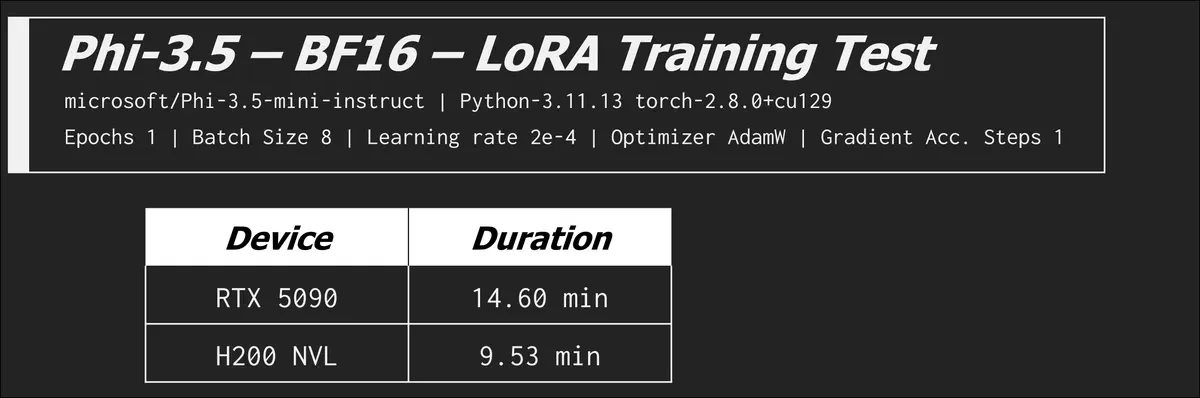
Again a win! Let's keep cranking up the size of the model, when does the RTX 5090 fail?
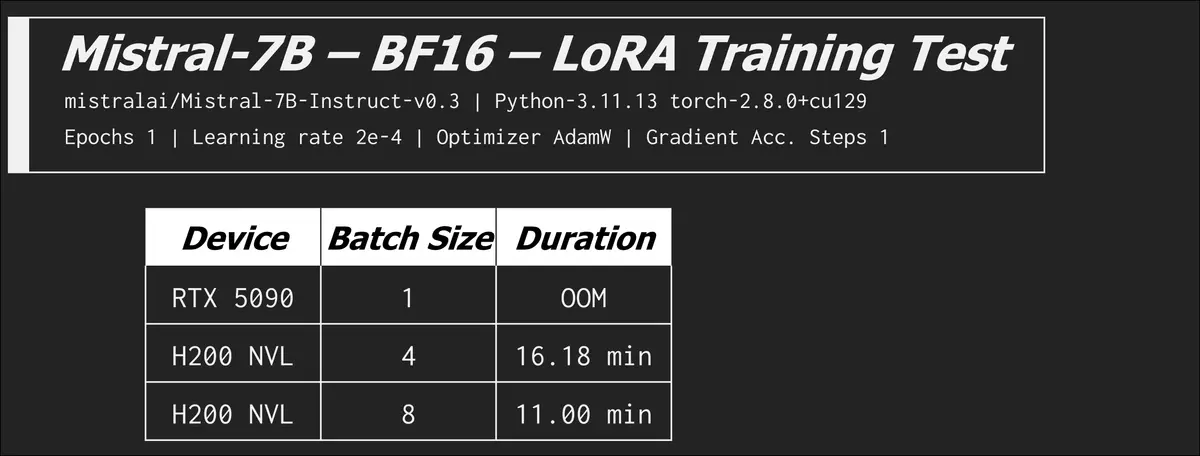
At a batch size of 1 we got an out of memory error part way through training. At a batch size of 1 and gradient accumulation steps (GAS) set to 4 we observed memory usage early in the training process already at ~31GB of VRAM. In the table above you can see the H200 NVL continuing to chug through our permutations of increasing batch sizes while the 5090 couldn't even compete out of the gate. In this arena the extra compute is all for naught.
You can see that as we increase the batch size the training time is cut significantly. Increasing the batch size is akin to increasing the amount of cereal you are loading up per spoon as you eat your breakfast. Bigger bites will get you through your bowl of Froot Loops before Saturday morning cartoons start. At a batch size of 8 the memory usage climbed to an observed ~116GB, the H200 NVL just went SSJ3 on the base form RTX 5090.
We did manage to get the RTX 5090 to complete an epoch of training but we had to do a couple things. To complete a training run at a precision of BF16 we had to limit the training data set to 4000 samples down from the original 20000, this got us a completion in 8 minutes, but we had to more than cut the data in half to do so, which isn't ideal in a training scenario if the goal is to train on the full dataset. In some LoRA fine-tuning scenarios, we don’t need 20000 samples, a few thousand high-quality samples can be enough to achieve good results. So while the RTX 5090 struggled with the medium-scale configuration (20000 samples at BF16), it could still be a solid option for smaller LoRA experiments or personal projects.
We also lowered the precision to 8Bit using variation of LoRA called quantized low rank adaptation (QLoRA).
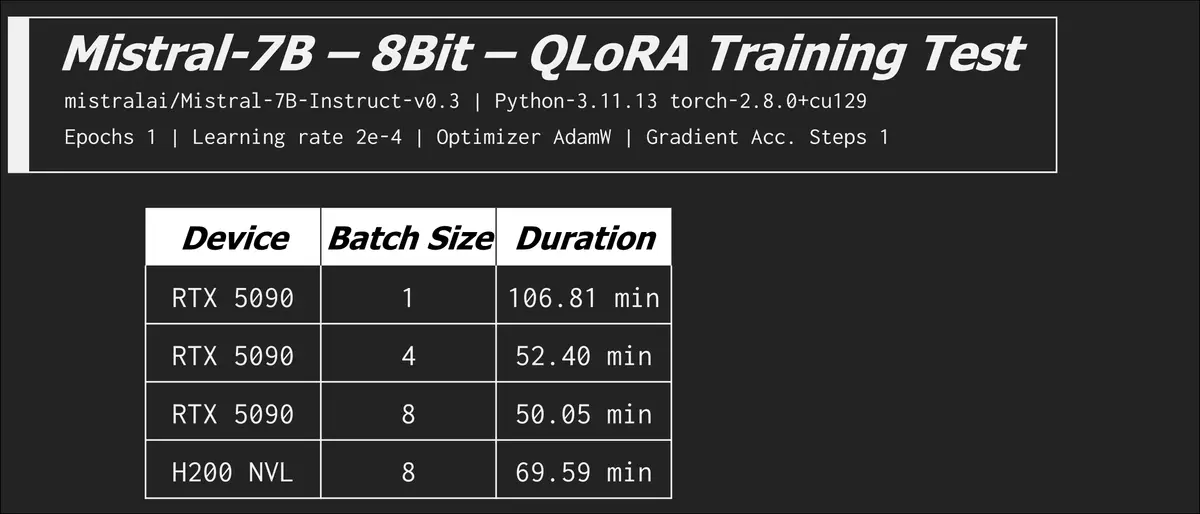
The 8bit quantization config enables memory-efficient training using bitsandbytes. For models like Mistral-7B or LLaMA-8B, 5090 cannot complete training with bf16 due to memory limitations, but 8bit quantization allows it to work. While 8bit quantization can significantly reduce memory usage, it often results in slower training compared to bf16/fp16. Quantization trades extra operations in exchange for reduced memory usage.
In the last row see how the RTX 5090 goes back to beating the H200 NVL? When we remove the memory bottleneck the compute advantage rears its head. There are optimizations and configurations you can tweak to exchange VRAM usage for time, but it can be very time costly. We saw the batch size of 8 (LorA) on the H200 NVL increase from 11 minutes to over an hour!
Conclusion
So did we basically just prove we wasted our time, maybe. A useful shopping comparison these benchmarks do not make. Yes, this is a nonsensical comparison but these results really highlight the strengths of consumer cards for at home and small business LLM usage. On the other hand these results show where those millions of dollars of “training” go to to create the base models we fine tune.
The RTX 5090 is the fastest GRAPHICS card on the planet for gamers that CAN do some very impressive AI inference, and even some fine tuning. But I wouldn't call the H200 NVL or these classes of devices graphics cards anymore, they are AI accelerators. They are more akin to specialized AI chips like NPUs and Raspberry PI AI hats. What these devices have in common is specialized hardware for matrix multiplication and tensor operations; the stuff AI is made of.
We'd love to hear your thoughts on the LTT forum!